
| Table of ContentsWhat a warehouse receiving module doesThe receiving workflow from dock to shelfPO matching and how to automate itHandling over, short, and wrong deliveriesBlind or directed receivingAdding quality checks to receivingLabeling received stockPutaway logicThe data model behind receivingWhat it costs to buildProof: a photo-based inspection system we shippedFAQs |
Most inventory errors a warehouse fights later were let in at the receiving door. In more than 11 years of building operational systems, most recently as a Technical Project Manager at Acquaint Softtech, a software product development partner, I have seen stock counts drift for months because one short delivery was accepted as complete.
A receiving module stops that at the source. It checks every delivery against what was ordered, holds anything doubtful for inspection, and tells staff exactly where to put each pallet.
It draws on Acquaint Softtech’s work as an Official Laravel Partner, with 70+ in-house engineers building systems for clients across the USA, UK, Europe, and Australia.
What a warehouse receiving module does
A warehouse receiving module records inbound goods, verifies them against the purchase order, checks their condition, and directs them to a storage location.
What is the receiving process in a warehouse?
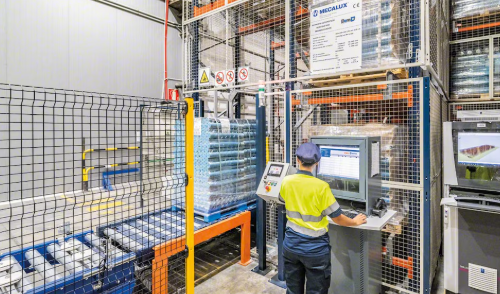
Receiving is the set of steps between a truck arriving and its goods being available in inventory: unloading, identifying, counting, checking, labeling, and putting away. Each step should leave a scan-based record, so every discrepancy is traceable.
The receiving workflow from dock to shelf
A complete receiving workflow has seven stages, and the first starts before the truck arrives. An ASN (advance shipping notice, the supplier’s electronic list of what is on the truck) lets the warehouse plan labor and pre-check the delivery.
| Stage | What happens | System record |
| 1. Pre-receipt | ASN received, dock slot booked | Expected receipt |
| 2. Arrival | Truck checked in and unloaded | Arrival time and dock |
| 3. Identify and count | Items scanned and quantities recorded | Receipt lines |
| 4. Match | Receipt compared to PO and ASN | Matched or exception |
| 5. Inspect | Quality check where rules require it | Pass, fail, or hold |
| 6. Label | License plate number applied | LPN linked to stock |
| 7. Putaway | Stock moved to a directed location | Available inventory |
PO matching and how to automate it
PO matching compares what arrived with what the purchase order and ASN said would arrive, line by line, on item, quantity, and unit of measure. Automated matching accepts lines within tolerance instantly and sends only real discrepancies to a person.
How do you automate PO matching?
Match each scanned item to an open PO line by SKU and supplier, convert units of measure first (cases to eaches, for example), then compare quantities against a tolerance rule. Store tolerances per supplier or item category as data, so buyers can tighten them without a code change.
| Match type | What it compares | Typical owner |
| Two-way | PO against supplier invoice | Accounts payable |
| Three-way | PO, goods receipt, and invoice | Accounts payable and warehouse |
| Four-way | Three-way plus inspection result | Regulated or high-value goods |
Handling over, short, and wrong deliveries
Every discrepancy should become a structured exception with a type, quantity, and photo, not a note on a paper packing slip.
What should the system do with each exception?
Short and damaged quantities should reduce the receipt and flag the PO line for supplier follow-up. Over-deliveries and wrong items should go to a quarantine location with a hold status, so they never enter sellable stock until a buyer accepts or returns them.
Blind or directed receiving
In blind receiving, staff count goods without seeing the expected quantity; in directed receiving, the screen shows the expected quantity for confirmation. Blind receiving produces more honest counts, because nobody can simply confirm the number on screen.
Which one should you build?
Support both and set the mode per supplier. Use blind receiving for new or error-prone suppliers and directed receiving for trusted ones with accurate ASNs.
Adding quality checks to receiving
Quality checks belong inside receiving as a rule-driven step, not a separate process that happens later.
How do you add a quality check to receiving?
Define inspection rules by supplier, item category, or history, such as inspecting every delivery from a new supplier and a sample from proven ones. Received stock waits in an inspection hold status until an inspector records pass or fail, with required photos and reason codes for every failure.
Can inspection photos be checked automatically?
Yes, image models can flag visible damage such as crushed cartons, dents, or torn packaging, and send uncertain cases to a person. Partners offering AI development services can train this on your own photo history, which works better than a generic model.
Labeling received stock
Every received unit load should get an LPN (license plate number, a unique barcode for a pallet, case, or tote). The LPN links the physical load to its item, quantity, lot, expiry, and receipt, so every later scan finds the full history.
Putaway logic
Putaway logic is the rule set that decides which storage location each received load goes to. Directed putaway replaces staff choosing an empty shelf with a system suggestion that respects capacity, handling rules, and pick efficiency.
| Rule | What it checks | Why it matters |
| Handling constraints | Temperature, hazard, security | Safety and compliance |
| Consolidation | Existing location with same SKU and lot | Fewer split locations |
| Velocity zone | Fast movers near pick faces | Shorter pick travel |
| Capacity fit | Weight, volume, dimensions | No overfilled locations |
| Travel distance | Nearest valid location | Faster putaway |
How should the rules be ordered?
Apply hard constraints first as filters, then rank the remaining locations by consolidation, velocity, and distance. If a pick face needs replenishment or an outbound order is waiting, the module should suggest cross-docking, moving goods straight to shipping without storing them.
The data model behind receiving
A receiving module needs purchase orders and lines, ASNs, receipts and receipt lines, inspections, LPNs, exceptions, and putaway tasks. Every scan should be stored as an event with a user, device, and timestamp.
What makes the build reliable?
Scans must be idempotent, meaning a repeated scan never counts stock twice, because handheld devices retry on weak Wi-Fi. Matching and putaway suggestions run well as queued jobs in Laravel, and teams that hire Laravel developers can build the receipt, exception, and putaway flow as one consistent backend.
What it costs to build
The cost of a receiving module depends on how much matching logic, inspection, and directed putaway you need. Basic receipt and PO matching is the cheapest starting point.
| Scope | What you get | Typical range (USD) |
| Core receiving | Receipts, PO matching, exceptions, LPN labels | 15,000 to 35,000 |
| Full inbound module | ASN, QC rules, photos, directed putaway, cross-dock | 35,000 to 75,000 |
How do you phase it?
Ship receipt, matching, and exceptions first, then add inspection rules and directed putaway once receiving data is reliable. This staged build runs at up to forty percent cost savings versus Western agencies, at blended rates of roughly twenty-five to forty-nine US dollars per hour.
Proof: a photo-based inspection system we shipped
Acquaint Softtech upgraded the AI inspection system and web app for Good2Know, a Tallinn-based platform that inspects used cars from a single photo. The account below is drawn from the client’s verified 5.0 out of 5 Clutch review.
| Challenge | Solution | Result |
| Model missed small defects | New inspection model and training pipeline | Users trusted flags on minor flaws |
| Poor results in low light | Improved image preprocessing | Shapes detected in low-light photos |
| Ambiguous results frustrated users | Confidence explanations and admin review | Fewer complaints about unclear results |
The same pattern suits receiving: photos at inspection, a model that flags likely damage with a confidence level, and a human review queue for anything uncertain.
FAQs
What is the receiving process in a warehouse?
It covers unloading, identifying, counting, matching to the PO, inspecting, labeling, and putting goods away. Receiving ends when stock is available in inventory.
How do you automate PO matching?
Match scanned items to open PO lines, convert units of measure, and compare quantities against supplier-level tolerance rules. Lines within tolerance are accepted automatically.
What is putaway logic?
Putaway logic is the rule set that chooses a storage location for each received load. It filters by handling constraints, then ranks locations by consolidation, velocity, and distance.
How do you add a quality check to receiving?
Create inspection rules by supplier or item, place received stock on inspection hold, and record pass or fail with photos and reason codes. Failed stock stays in quarantine.
What is blind receiving?
Blind receiving hides the expected quantity from the person counting. It produces more accurate counts because staff cannot simply confirm the number on screen.
What is an LPN in a warehouse?
An LPN, or license plate number, is a unique barcode on a pallet, case, or tote. It links the load to its item, quantity, lot, and receiving history.